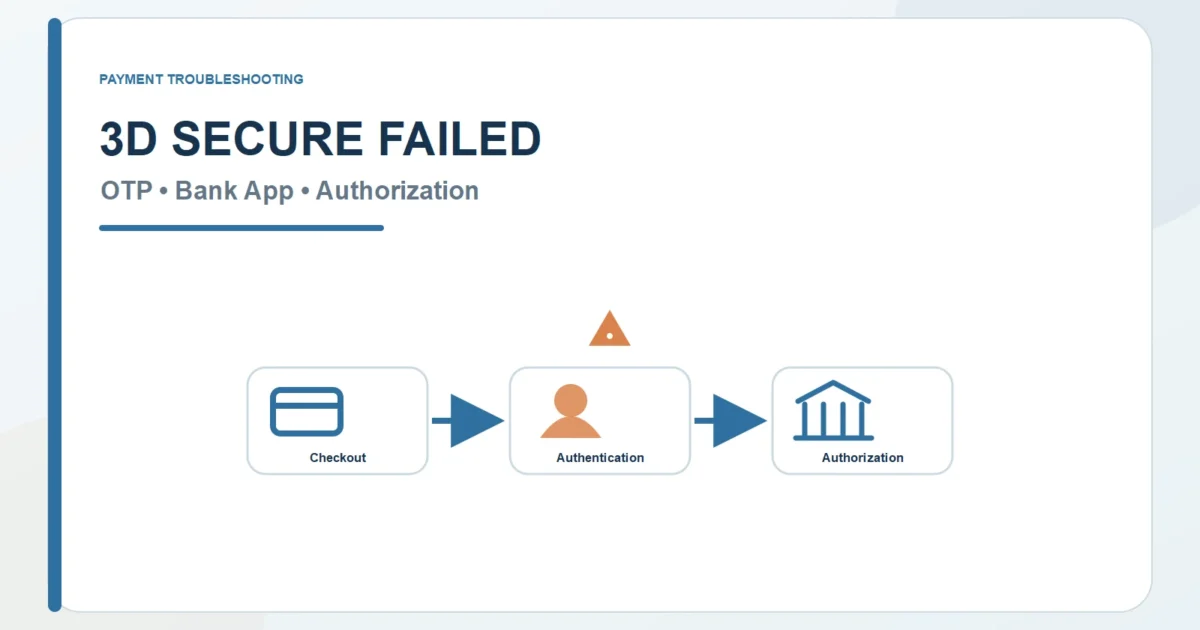
Authentication Gate
3D Secure Failed? OTP, Bank App, and Authorization Fixes
A 3D Secure problem can happen before you ever see a prompt, inside the OTP or bank-app challenge, or after authentication has already succeeded. Those are three different failures with different owners. This guide helps you locate the stage before you retry the payment.
First Read
First Find the Stage: Before, During, or After the Challenge
Stage one: no challenge appears or the merchant cannot start the authentication route. Stage two: the challenge appears but the OTP, bank app, browser, device, or session cannot finish. Stage three: authentication completes, but the issuer later declines the card authorization. Do not troubleshoot all three as the same “3D Secure failure.”
Authentication State Map
Authentication and Authorization Are Two Different Decisions
EMV 3-D Secure can be frictionless with no visible prompt or challenged with an OTP, issuer app, password, biometric, or another approved method. The merchant and authentication components have to start the flow, the issuer has to complete any challenge, and the payment still has to pass authorization afterward. No visible OTP does not automatically mean 3D Secure was skipped.
| Stage or Symptom | Likely Owner | Next Evidence |
|---|---|---|
| Stage 2: No OTP arrives | The issuer or its authentication channel owns the delivery problem when a challenge has actually been requested | Confirm that a challenge started, then check the registered phone or email, roaming and signal, issuer app, message delay, supported challenge method, and whether a newer request replaced the old one |
| Stage 2: Bank-app approval does not appear or return | The issuer app, device, or challenge handoff owns the visible problem | Open the official app directly; check login, push notifications, trusted-device status, app version, current pending challenge, and whether the app can return to the same browser or merchant session |
| Stage 2: The challenge or checkout session expires | The merchant session, browser or app handoff, and authentication session are no longer aligned | First check whether an order or pending authorization already exists. If not, start one fresh checkout, use only its current challenge, and avoid parallel tabs or repeated payment attempts |
| Stage 2: The OTP is rejected | The issuer challenge may be receiving an old, mistyped, expired, or different-session code | Use only the newest code for the current transaction. If the session expired, stop using earlier codes and request a new challenge only after confirming the previous attempt did not create a completed or pending payment |
| Stage 1 or 2: The challenge page will not load or return | The merchant integration, browser, app handoff, device, or authentication page may be breaking the session | Check supported browser or device, required cookies and redirects, extensions or blockers, private mode, app handoff, VPN or network changes, and whether the same attempt is still active |
| Stage 3: Authentication succeeds but the payment is declined | The 3D Secure stage finished; the later card authorization is now the problem | Read the official issuer message, available funds or credit, card status and controls, merchant country or category, billing profile, currency, recurring setup, amount, and processor response |
| Stage 1 or 2: Merchant or processor cannot complete 3D Secure | The merchant integration or processor may fail before the issuer can finish authentication | Confirm the order and payment state, save the merchant error, check service notices, and ask whether the issuer received an authentication or authorization request before retrying |
| Stage 1: The required 3D Secure route is not supported | The card program, issuer, merchant, processor, country, or transaction may not support the required authentication flow | Check the exact card product and program, issuer participation, merchant integration, processor, country, transaction type, and whether the checkout requires a flow this route cannot provide |
Route Preflight
Read the Merchant Order and Authentication State Before You Retry
Start with the order and payment state, then follow one checkout attempt from merchant initiation to issuer challenge and final card authorization. Multiple tabs, old OTPs, repeated retries, and switching methods too early can make the evidence harder to read.
1. Did a Challenge Actually Start?
Do not assume an OTP must appear. The flow may be frictionless, the merchant may fail before challenge, or the issuer may choose another method. Record whether you saw no prompt, a redirect, an app request, an OTP screen, or a completed authentication result.
2. Use Only the Current Issuer Challenge
If the issuer uses an OTP, app approval, password, or biometric challenge, use only the current official request for this transaction. Open the issuer app or page directly, ignore unverified links, and do not mix an old code or older app request with a newer checkout attempt.
3. Check the Issuer’s Delivery and Device Channel
Check the registered phone or email, signal and roaming, push notifications, trusted-device status, app login, app version, and any current challenge shown by the issuer. If the required channel is unavailable, the issuer owns that part of the problem.
4. Keep the Checkout and Challenge in the Same Session
Required redirects, cookies, browser extensions, private mode, app handoff, device support, VPN or network changes can break the handoff. Before restarting, confirm the old attempt did not create an order or pending authorization, then use one fresh checkout rather than parallel tabs.
5. After Authentication, Read the Card Authorization
If authentication succeeds, stop troubleshooting the OTP or app. Read the later card result instead: issuer message, available funds or credit, card status and controls, merchant country or category, billing profile, currency, amount, recurring setup, international-use conditions, and processor response.
6. Stop Before Creating Another Authorization
Confirm whether the attempt is declined, pending, completed, reversed, or tied to a merchant order before starting another checkout. If the issuer challenge itself is unavailable, contact the issuer through an official channel about the registered contact method, app or device setup, card status, and authentication result. If authentication succeeded but authorization failed, ask about the card decline instead.
Stage by Stage
The Screen Tells You Which Stage Broke
Use the screen you actually saw. No prompt, rejected code, broken redirect, missing app request, successful authentication followed by decline, and foreign-only failure point to different stages and owners.
| Visible Stage | What It Suggests | Next Evidence |
|---|---|---|
| Stage 2: A challenge was requested, but no code arrives | The issuer delivery channel may be wrong, delayed, unavailable, or replaced by another approved challenge method | Confirm the challenge started, then check registered contact details, signal and roaming, issuer app, supported method, and whether a newer request replaced the old one |
| Stage 2: The code is rejected | The code may be old, mistyped, expired, or tied to a different checkout session | Use only the current challenge for the current attempt; if the session expired, first confirm no pending payment exists before starting one new checkout |
| Stage 1 or 2: The page or redirect does not load | The merchant integration, browser, app handoff, device, or authentication session may be breaking before completion | Check supported browser or device, cookies and redirects, extensions or blockers, private mode, app handoff, VPN or network changes, and whether the old attempt is still active before starting a fresh session |
| Stage 2: App approval does not appear | The issuer challenge exists, but the app, trusted-device state, notification, or app-to-browser handoff is not presenting it correctly | Open the official issuer app directly; check login, app version, notifications, trusted device, current pending request, and whether it can return to the same merchant session |
| Stage 3: Authentication succeeds but payment fails | The authentication stage is over; the later card authorization, merchant acceptance, or processor response now owns the problem | Read the issuer decline message, available funds or credit, card status and controls, merchant country or category, billing profile, currency, amount, recurring setup, and processor response |
| Stage 1, 2, or 3: Only foreign websites fail | The cross-border route may change merchant eligibility, authentication requirements, issuer controls, card or account country, account region, currency, or risk | Record where the flow stops, then check merchant and card countries, account region, currency, online and international-use controls, authentication method, merchant category, and issuer message |
Failed Gate Map
When 3D Secure Ends, Another Gate May Own the Problem
Once you know the authentication stage, move to the guide that owns the next visible problem. A successful challenge followed by decline is a card-authorization issue; a rejected profile or cross-border route belongs elsewhere.
Card Authorization Gate
If authentication completes but payment fails, review the separate authorization result, available funds or credit, card status and controls, merchant rules, currency, and issuer message.
Profile or Country Gate
Billing information and address-verification results can affect checkout or authorization separately from the EMV 3-D Secure authentication result.
Cross-Border Route Gate
A cross-border payment may be declined or held because of issuer settings, merchant-country or account-region rules, currency, funds or limits, processor checks, or applicable restrictions before or after authentication.
Before You Open a New Route
Another Method Does Not Repair the 3D Secure Attempt
First confirm whether the 3D Secure attempt created an order, pending authorization, completed charge, reversal, or issuer challenge that is still active. Another card, PayPal, Apple Pay, Google Pay, Wise Card, or gift-card balance starts a new route with its own authentication and authorization conditions; it does not cancel the first attempt.
Direct Card Route
Another card creates a new issuer and card-authorization route. The merchant must accept its exact card profile, and that issuer may start a different frictionless or challenged 3D Secure flow before authorization. Confirm the original attempt first.
PayPal Checkout Layer
PayPal creates a separate merchant checkout and account route, but the selected funding card may still face its own issuer authentication or authorization. Check the PayPal account, funding source, billing agreement, country, currency, and first transaction state before switching.
Apple Pay Wallet Handoff
Apple Pay changes the wallet and device handoff, not the issuer’s underlying card decision. A participating issuer may still authenticate or decline the card. Confirm the original attempt, then check merchant integration, Wallet card, device, country, currency, and issuer result.
Google Pay Account Checkout
Google Pay creates a merchant API and payment-sheet route using a saved method. The underlying card or account can still face its own authentication and authorization. Confirm the original state, then check the Google Account, saved method, merchant flow, country, currency, and issuer or institution result.
Wise Account-to-Card Layer
Wise Card creates a new issued-card route backed by the Wise account, balances, and conversion. Merchant card acceptance, Wise controls, authentication, and authorization still apply, and the new attempt does not resolve the original 3D Secure session.
Closed Store Balance
A gift card moves the purchase into closed store balance and may avoid a new card authorization for an eligible purchase. It does not cancel a pending card authentication or authorization. Check seller and code, account and store region, currency, balance, product, subscription, and refund rules.
Return to the Corridor
The Country Pair Changes the Authentication Route
A 3D Secure route can change with issuer country, merchant country, exact card product, network program, processor, transaction data, device/browser/app context, billing/store profile, currency, recurring model, payment state, and applicable rules. Record whether the route was frictionless or challenged and where it stopped, then open the payer → destination Route Map that matches the real payment.
Straight Answers
Which 3D Secure Stage Controls the Answer?
The answer usually depends on one missing stage: whether the merchant started 3D Secure, whether the issuer challenge finished, or whether authentication passed and the later card authorization failed.
Why does 3D Secure keep failing?
Start by naming the stage. No challenge can mean a frictionless flow or a failure before challenge. A visible challenge can fail because of issuer delivery, app, device, browser, session, or code problems. If authentication succeeds, the later decline belongs to card authorization rather than to the OTP itself.
What should I do if I do not receive the OTP?
First confirm that the transaction actually requested a challenge. Then check the issuer’s official app or website, registered phone or email, signal and roaming, current pending request, and whether another approved challenge method is used. Contact the issuer through an official channel if its required challenge cannot be delivered.
Can 3D Secure fail because of my browser?
Yes. Required redirects, cookies, extensions, private mode, app-to-browser handoff, device support, VPN or network changes, and an interrupted merchant session can stop the challenge. Before restarting, confirm that the old attempt did not create an order or pending authorization.
Why does authentication succeed but the payment still fail?
Because 3D Secure answers an authentication question, not the final payment question. After authentication, the issuer or processor can still reject the card for available funds or credit, card status, amount, merchant country or category, billing profile, currency, recurring setup, controls, or risk.
Can I bypass 3D Secure?
A required authentication challenge is part of that payment route, not an obstacle to evade. If the issuer’s required method is unavailable, contact the issuer through an official channel. A merchant-listed alternative creates a separate route with its own account, authentication, authorization, and transaction state; it does not bypass the first route.
What We Checked
Who Controls the 3D Secure Flow?
We reviewed EMVCo, Visa, and Mastercard documentation on August 2, 2026. The sources support the three-stage model used here: EMV 3-D Secure can authenticate without a visible challenge or with an issuer challenge; merchants and processors participate in starting and carrying the flow; and successful authentication remains separate from the later card-authorization decision.
- EMVCo: EMV 3-D Secure — official overview of the global card-not-present authentication protocol.
- Visa: 3D Secure guide — official explanation of risk-based authentication and additional cardholder verification.
- Visa Secure — official Visa program information and issuer-participation guidance.
- Mastercard: Authentication and Identity Check — official EMV 3DS and risk-based authentication information.
- Mastercard ID Check — official examples of password, SMS one-time password, and biometric authentication.
Our read: EMVCo defines the protocol. The card networks operate their authentication programs. The merchant and processor must send the route into the supported flow. The issuer controls its cardholder challenge and registered authentication channels. A transaction may authenticate frictionlessly with no OTP or app prompt. If a challenge succeeds, that proves the authentication stage only; the issuer or payment chain can still decline the later authorization. When no challenge appears, first determine whether the flow was frictionless or whether it failed before the issuer challenge rather than assuming 3D Secure was skipped.
Freshness Check
How Current Is This Authentication Gate?
We last checked this Authentication Gate on August 2, 2026, and scheduled the next review for November 2, 2026. Network programs, merchant/processor integrations, frictionless risk decisions, issuer challenge methods, registered channels, devices/apps, countries, currencies, transaction data, recurring rules, later authorization, payment states, refunds, disputes, and recovery procedures can change before then. Use the live checkout, current issuer challenge, and final card/account state for the decision.
Last checked: August 2, 2026